Welcome to the new episode of:

In this session we will complete the setup for the membrane protein KcsA and we will analyse the configuration files to perform the simulation1.
The updated files you need are available here. The archive contains the latest system we obtained last time (with CHARMm 36 :|) and the configuration files.
You are, as always, encouraged to read the tutorial in the Notes.
Previously on FS&HTCT
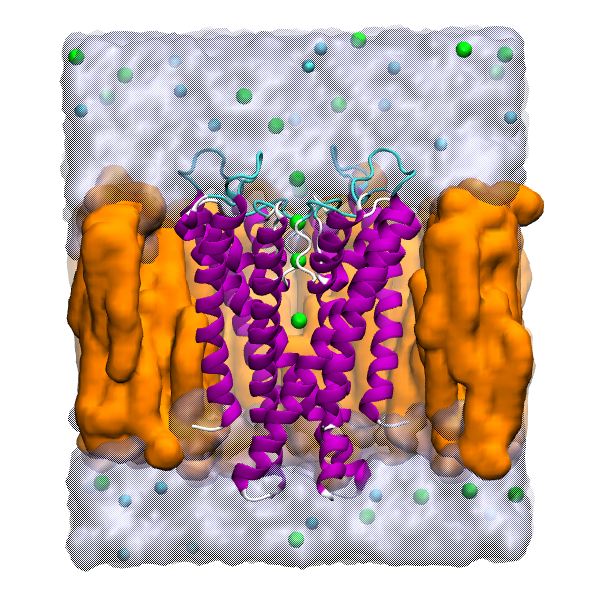
What we want to obtain is something like the following setup:
Recap
We want to go from the 1K4C.pdb to the tetramer embedded in a lipidic bilaryer.
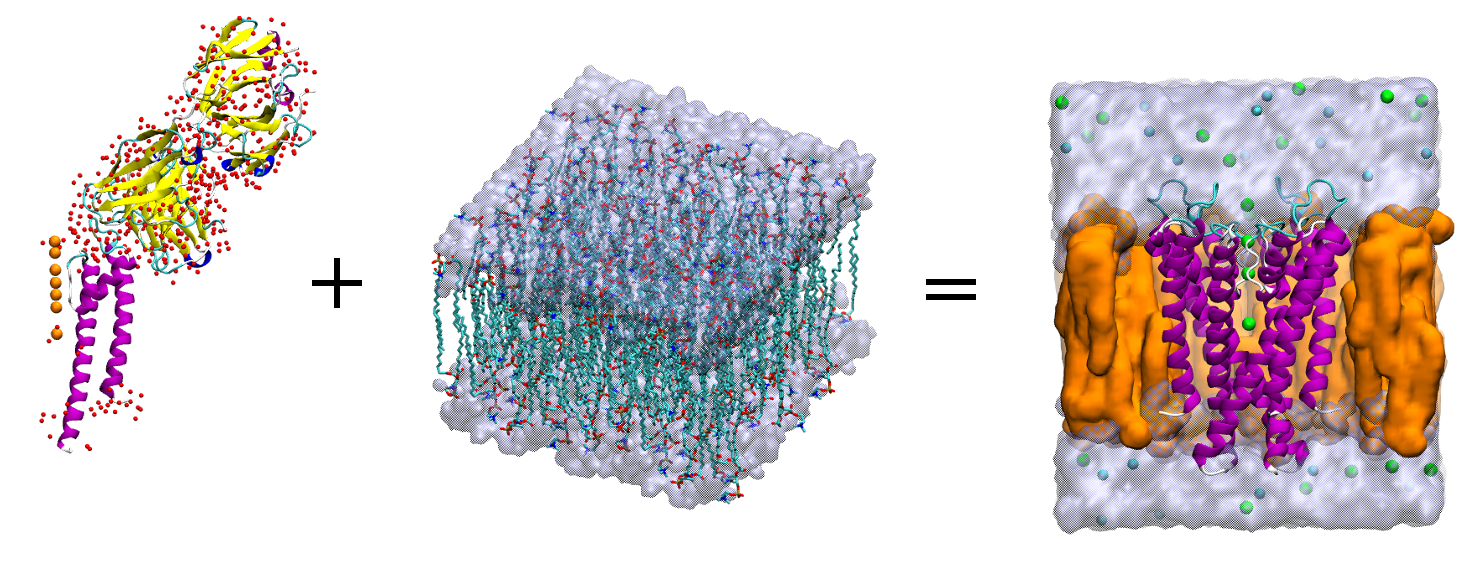
The equation of love <3.
What we did last time:
- Built the tetramer from the experimental pdb;
- Extracted the chains we were interested in, i.e. the channel helices, the potassium ions, and the waters;
- Solvated the structure with a layer of water and delete the excess of water;
- Created the membrane patch.
We will continue now from this point.
Membrane patch
Create a membrane 90x90 Angstrom of POPC (a kind of lipids generally used im membrane protein simulation). Use the CHARMm 36 ff.
We changed the ff, soz!
After building it, the membrane, oriented with the z axis normal to its surface, is loaded by default.
Center the membrane and save the new coords as popc_TEMP.pdb
As a convention, the setup has the membrane parallel to the xy plane, and the protein is aligned to the z axis.
Load the kcsa_solv.p*. We want to center the protein using the center of mass
of residue 97 to 106.
Assuming that the protein is loaded as the top molecule:
set kcsa [atomselect top "all"]
set vest [atomselect top "protein and resid 97 to 106"]
$kcsa moveby [vecinvert [measure center $vest weight mass]]
display resetview
$kcsa move [transaxis z -25]
$kcsa writepdb kcsa_TEMP.pdb
And we now join the two structure: protein and membrane.
mol delete all
package require psfgen
resetpsf
readpsf popc.psf
coordpdb popc_TEMP.pdb
readpsf kcsa_solv.psf
coordpdb kcsa_TEMP.pdb
writepsf kcsa_popc_raw.psf
writepdb kcsa_popc_raw.pdb
file delete kcsa_TEMP.pdb
file delete popc_TEMP.pdb
The system is not yet the final one. In fact, we need to remove the lipids that overlap the protein.
Always visualise what you want to delete!
Load the latest files:
mol delete all
mol new kcsa_popc_raw.psf
mol addfile kcsa_popc_raw.pdb
and visualise the lipids by using the selection defined below.
set POPC "resname POPC"
set all [atomselect top all]
$all set beta 0

set seltext1 "$POPC and same residue as \
(name P and z>0 and abs(x)<15 and abs(y)<15)"
set seltext2 "$POPC and same residue as \
(name P and z<0 and abs(x)<10 and abs(y)<10)"
set seltext3 "$POPC and same residue as (within 0.6 of protein)"
set sel1 [atomselect top $seltext1]
set sel2 [atomselect top $seltext2]
set sel3 [atomselect top $seltext3]
$sel1 set beta 1
$sel2 set beta 1
$sel3 set beta 1
set badlipid [atomselect top "name P and beta > 0"]
set seglistlipid [$badlipid get segid]
set reslistlipid [$badlipid get resid]
With the membrane, also water molecules are generated. We need to remove them all.
set seltext4 "(water and not segname WCA WCB WCC WCD WF SOLV) \
and same residue as within 3 of \
((same residue as (name P and beta>0)) or protein)"
set seltext5 "segname SOLV and same residue as \
within 3 of lipids"
set sel4 [atomselect top $seltext4]
set sel5 [atomselect top $seltext5]
$sel4 set beta 1
$sel5 set beta 1
set badwater [atomselect top "name OH2 and beta > 0"]
set seglistwater [$badwater get segid]
set reslistwater [$badwater get resid]
As we saw before, we will now delete the unwanted residues.
mol delete all
resetpsf
readpsf kcsa_popc_raw.psf
coordpdb kcsa_popc_raw.pdb
foreach segid $seglistlipid resid $reslistlipid {
  delatom $segid $resid
}

foreach segid $seglistwater resid $reslistwater {
  delatom $segid $resid
}
writepsf kcsa_popc.psf
writepdb kcsa_popc.pdb
Solvate and ionise
Now, you have to solvate and ionise (0.4M KCl) the system.
For the xy dimension, use the minmax of water. Add 5 Angstrom above and below
in the z axis.
Use:
package require solvate
solvate kcsa_popc.psf kcsa_popc.pdb -o kcsa_popc_water_TEMP -b 1.5 -minmax { {vec1} {vec2} }
If we draw the water molecules just added, we see that some of them are within the membrane. We have to delete them!
Let’s visualise the unwanted molecules, remember to not apply it to the
WF,WCA/B/C/D, SOLV.
An idea for the selection could be:
set all [atomselect top all]
$all set beta 0
set seltext "segid WT1 to WT99 and same residue as abs(z) < 25"
set sel [atomselect top $seltext]
$sel set beta 1
set badwater [atomselect top "name OH2 and beta > 0"]
set seglist [$badwater get segid]
set reslist [$badwater get resid]
but check that the added water residues are properly counted.
Once you have defined the seglist and reslist we can delete the selected
residues.
mol delete all
package require psfgen
resetpsf
readpsf kcsa_popc_water TEMP.psf
coordpdb kcsa_popc_water TEMP.pdb
foreach segid $seglist resid $reslist {
delatom $segid $resid
}
writepdb kcsa_popcw.pdb
writepsf kcsa_popcw.psf
file delete kcsa_popc_water_TEMP.psf
file delete kcsa_popc_water_TEMP.pdb
Finally we can add the ions with the Add ions package.
Notes
-
See Membrane tutorial for the references. ↩